Build Your AI Agent

Human-like conversations with real outcomes
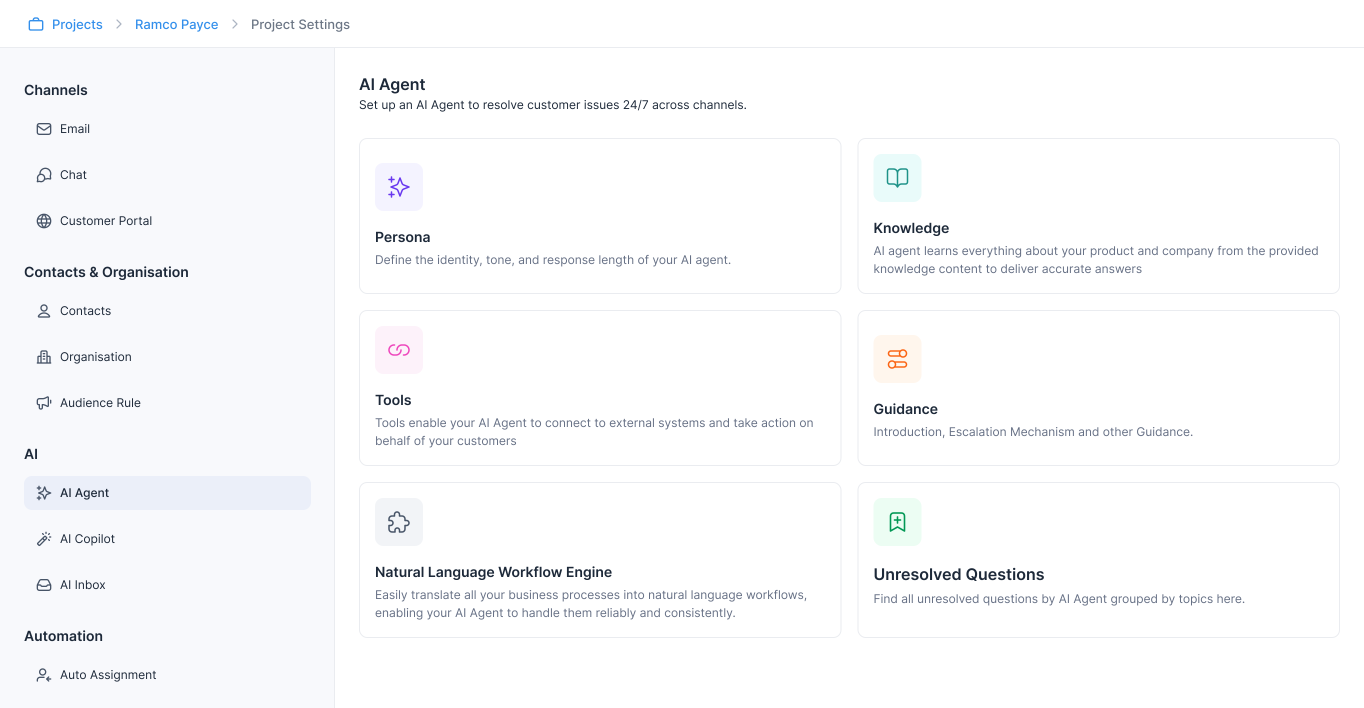
	 rTask Conversational AI agent builder interface – Ramco
	 rTask Conversational AI agent builder interface – Ramco
	 rTask Conversational AI agent builder interface – Ramco
	 rTask Conversational AI agent builder interface – Ramco

Step 1

Unify Your Enterprise Data Layer

Connect legacy systems and cloud services via APIs into a united, governed data layer. Allow AI agents to securely access customer data, transactions, business rules, and proprietary knowledge in real time—while maintaining enterprise security, compliance, and governance standards.

  • Public URL

  • Articles

  • Confluence

  • Google Drive

  • Notion

  • Files

  • Previous Conversation

  • Public URL

  • Articles

  • Confluence

  • Google Drive

  • Notion

  • Files

  • Previous Conversation

  • Public URL

  • Articles

  • Confluence

  • Google Drive

  • Notion

  • Files

  • Previous Conversation

Chia AI Agent
Chia AI Agent
Chia AI Agent
  • Amazon

  • Shopify

  • MCP Tool

  • ebay

  • API Connection

  • SAP

  • HubSpot

  • Amazon

  • Shopify

  • MCP Tool

  • ebay

  • API Connection

  • SAP

  • HubSpot

  • Amazon

  • Shopify

  • MCP Tool

  • ebay

  • API Connection

  • SAP

  • HubSpot

Step 2

Define Enterprise-Grade Workflows & Business Logic

Natural language workflow builder, allows you to convert SOPs and complex processes into executable AI logic without coding. CX teams can quickly configure complex rules and change AI Agents behavior without waiting for engineering support​.

Lost Credit Card Workflow

Lost Credit Card Workflow

Lost Credit Card Workflow

Lost Credit Card Workflow

Step 1 - Customer Identification

Step 1 - Customer Identification

Step 1 - Customer Identification

Step 1 - Customer Identification

Ask the customer for their registered mobile number and use the @Customer Details API to retrieve the corresponding customer ID.

Ask the customer for their registered mobile number and use the @Customer Details API to retrieve the corresponding customer ID.

Ask the customer for their registered mobile number and use the @Customer Details API to retrieve the corresponding customer ID.

Ask the customer for their registered mobile number and use the @Customer Details API to retrieve the corresponding customer ID.

Step 2 - Card Verification

Step 2 - Card Verification

Step 2 - Card Verification

Step 2 - Card Verification

Request customer for the last four digits of their lost credit card and cross-check this input against the stored card details for verification.

Request customer for the last four digits of their lost credit card and cross-check this input against the stored card details for verification.

Request customer for the last four digits of their lost credit card and cross-check this input against the stored card details for verification.

Request customer for the last four digits of their lost credit card and cross-check this input against the stored card details for verification.

Step 3 - Blocking the Lost Card

Step 3 - Blocking the Lost Card

Step 3 - Blocking the Lost Card

Step 3 - Blocking the Lost Card

Trigger the @Block_Credit_Card API to immediately set the status of the reported card to "blocked" and ensure that no further transactions can be processed on it.

Trigger the @Block_Credit_Card API to immediately set the status of the reported card to "blocked" and ensure that no further transactions can be processed on it.

Trigger the @Block_Credit_Card API to immediately set the status of the reported card to "blocked" and ensure that no further transactions can be processed on it.

Trigger the @Block_Credit_Card API to immediately set the status of the reported card to "blocked" and ensure that no further transactions can be processed on it.

Step 4 - Replacement Fee Confirmation

Step 4 - Replacement Fee Confirmation

Step 4 - Replacement Fee Confirmation

Step 4 - Replacement Fee Confirmation

Inform the customer about the ₹300 card replacement fee and seek their confirmation to proceed.

Inform the customer about the ₹300 card replacement fee and seek their confirmation to proceed.

Inform the customer about the ₹300 card replacement fee and seek their confirmation to proceed.

Inform the customer about the ₹300 card replacement fee and seek their confirmation to proceed.

Step 5 - Replacement Request Initiation

Step 5 - Replacement Request Initiation

Step 5 - Replacement Request Initiation

Step 5 - Replacement Request Initiation

Upon receiving approval, initiate a replacement request using the @Issue_Card API.

Upon receiving approval, initiate a replacement request using the @Issue_Card API.

Upon receiving approval, initiate a replacement request using the @Issue_Card API.

Upon receiving approval, initiate a replacement request using the @Issue_Card API.

I lost my credit card. Please help me block it.

I lost my credit card. Please help me block it.

I lost my credit card. Please help me block it.

I lost my credit card. Please help me block it.

Lost Credit Card Workflow (Step 1 & 2)

Lost Credit Card Workflow (Step 1 & 2)

Lost Credit Card Workflow (Step 1 & 2)

Chia

Chia

Chia

Chia

I’m really sorry to hear that. Don’t worry, I’ll help you block it and get a new one. Could you please share your registered mobile number and Last 4 digit of the lost card?

I’m really sorry to hear that. Don’t worry, I’ll help you block it and get a new one. Could you please share your registered mobile number and Last 4 digit of the lost card?

I’m really sorry to hear that. Don’t worry, I’ll help you block it and get a new one. Could you please share your registered mobile number and Last 4 digit of the lost card?

I’m really sorry to hear that. Don’t worry, I’ll help you block it and get a new one. Could you please share your registered mobile number and Last 4 digit of the lost card?

It’s 9876543210 and last 4 digit is 1234.

It’s 9876543210 and last 4 digit is 1234.

It’s 9876543210 and last 4 digit is 1234.

It’s 9876543210 and last 4 digit is 1234.

Lost Credit Card Workflow (Step 3 & 4)

Lost Credit Card Workflow (Step 3 & 4)

Lost Credit Card Workflow (Step 3 & 4)

Chia

Chia

Chia

Chia

Got it. I’ve blocked your card ending in 1234 to keep your account safe🔒.

There’s a ₹300 replacement fee for the new card. Shall I go ahead and issue it?

Got it. I’ve blocked your card ending in 1234 to keep your account safe🔒.

There’s a ₹300 replacement fee for the new card. Shall I go ahead and issue it?

Got it. I’ve blocked your card ending in 1234 to keep your account safe🔒.

There’s a ₹300 replacement fee for the new card. Shall I go ahead and issue it?

Got it. I’ve blocked your card ending in 1234 to keep your account safe🔒.

There’s a ₹300 replacement fee for the new card. Shall I go ahead and issue it?

Yes, please.

Yes, please.

Yes, please.

Yes, please.

Chia

Chia

Chia

Chia

Done! Your replacement card request is raised, and it’ll reach you in 5–7 business days.

Done! Your replacement card request is raised, and it’ll reach you in 5–7 business days.

Done! Your replacement card request is raised, and it’ll reach you in 5–7 business days.

Done! Your replacement card request is raised, and it’ll reach you in 5–7 business days.

Step 3

Configure Intelligent Human Escalations

Define precise escalation policies to seamlessly hand off conversations to the right human expert with full context and intent. Reduce unnecessary escalations by up to 40% while ensuring critical issues reach humans instantly.

Describe When to Escalate to AI

Escalate when the customer expresses strong dissatisfaction, frustration, or uses negative/angry language. Also escalate if the customer repeatedly mentions unresolved issues, asks to speak with a human/manager, or if the AI detects a negative tone or sentiment that could impact the customer experience.

Describe When to Escalate to AI

Escalate when the customer expresses strong dissatisfaction, frustration, or uses negative/angry language. Also escalate if the customer repeatedly mentions unresolved issues, asks to speak with a human/manager, or if the AI detects a negative tone or sentiment that could impact the customer experience.

Describe When to Escalate to AI

Escalate when the customer expresses strong dissatisfaction, frustration, or uses negative/angry language. Also escalate if the customer repeatedly mentions unresolved issues, asks to speak with a human/manager, or if the AI detects a negative tone or sentiment that could impact the customer experience.

Describe When to Escalate to AI

Escalate when the customer expresses strong dissatisfaction, frustration, or uses negative/angry language. Also escalate if the customer repeatedly mentions unresolved issues, asks to speak with a human/manager, or if the AI detects a negative tone or sentiment that could impact the customer experience.

Step 4

Evaluate → Build → Release

Simulate live conversations, and review it end-to-end to understand how users might behave, where edge cases occur, and how failures are handled. Use these insights to refine prompts, logic, and data. Then validate with tests and deploy, monitoring performance in real-world use

Evaluate

Evaluate

Build

Release

Release

Step 5

Deploy Across All Customer Touchpoints

Deliver consistent, enterprise-grade experiences across chat, email, messaging. One AI engine, unified context, and centralised governance across every interaction.

Chat

Chat

Mail

Mail

Voice *

SMS *

Help Center

Help Center

* Upcoming Feature

See Chia in action

Learn how Chia powers human-like customer experiences with production-ready AI

See Chia in action

Learn how Chia powers human-like customer experiences with production-ready AI

See Chia in action

Learn how Chia powers human-like customer experiences with production-ready AI